

Overview
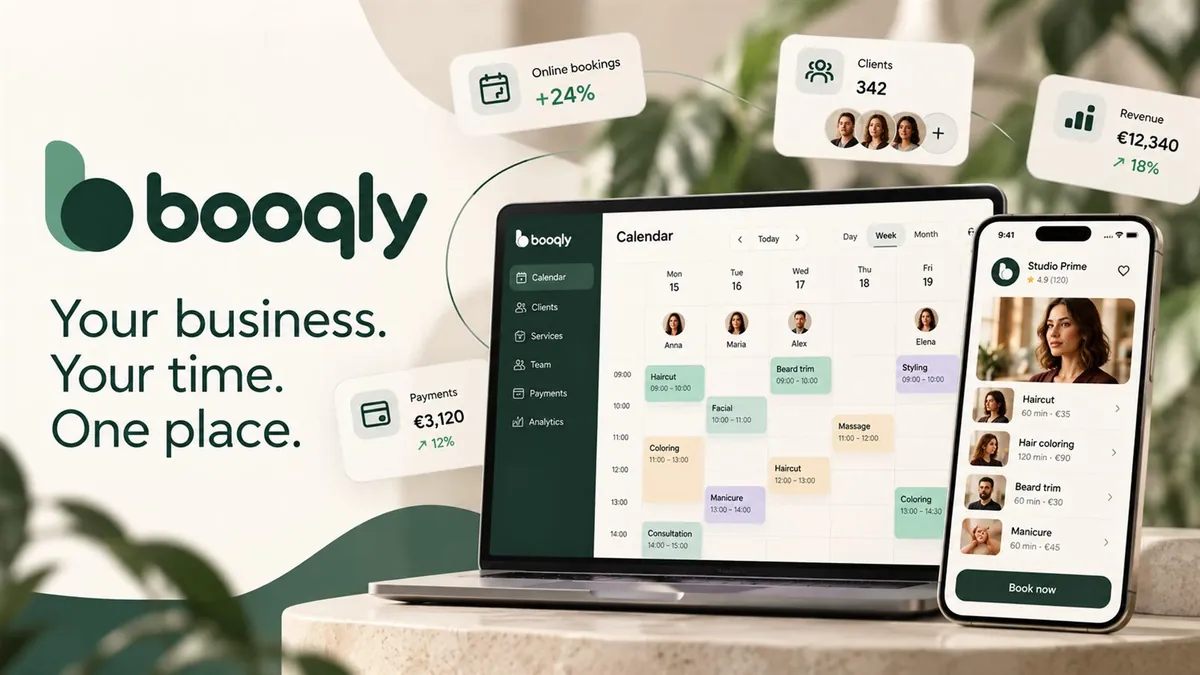
booqly is a SaaS platform for hair salons, barbershops, studios, beauty and therapy centers — every business that works with appointments. The idea is simple: Your business. Your time. One place. The calendar, clients, team, services, payments and online booking live in one place instead of being scattered across notebooks, chats, spreadsheets and different apps.
The project covers the whole user journey. It starts with the marketing site and sign-up, goes through business setup and day-to-day work in the app, and ends at the public page where clients book appointments themselves. The platform is fully available in Bulgarian and English.
The problem
Small appointment-based businesses usually run their day with several disconnected tools. Appointments are booked by phone or on Instagram, the schedule is on paper or in Google Calendar, and clients are in the phone’s contacts. Payments are tracked in a notebook, if at all. Time gets lost, double bookings happen, the owner has no clear view of revenue and team workload, and the client can’t simply book an appointment at 11 p.m.
The solution
One platform with three faces:
- 1Marketing site that presents the product, the solutions by business type and pricing, and leads to sign-up.
- 2Business app with 11 modules: overview, calendar, bookings, clients, services, team, online booking, analytics, payments, marketing and settings.
- 3Public booking page where clients choose a service, specialist, date and time themselves.
Key features
Interactive calendar
The calendar is the heart of the product. It has day, week, month and agenda views. The day view shows each team member in a separate column, and the week view shows the days. Both use the same component, which can render any set of columns. Appointments are moved by dragging, extended by pulling the bottom edge, and a new appointment is created by clicking an empty slot. All of this is written at a low level with pointer events, without an external calendar library. Overlapping appointments are laid out automatically in parallel lanes, and when there are too many lanes the extra ones are collapsed.
Online booking for clients
The public page guides the client through several steps: service → specialist → date → time. A summary on the side updates live. Available slots are calculated in real time from each team member’s working schedule, the service duration and the buffer time between clients, excluding already booked slots. The business decides which services can be booked online.
Running the business
- Clients: a profile with visit history, total spend, tags, notes and marketing consent.
- Team: individual working schedules, services each member performs, commission rate and performance stats.
- Services: categories, price, duration, buffer time and calendar color.
- Payments: paid, unpaid and refunded amounts, plus a split between collected and expected revenue.
- Overview: key metrics for the day, remaining free slots and a “needs attention” section for unconfirmed or unpaid bookings.
Analytics
The charts for revenue, bookings and team utilization are drawn directly in SVG, without a charting library. So the colors match the design system exactly and the app bundle doesn’t grow.
Automatic review requests
This is probably the most carefully thought-out feature. Once an appointment is paid and completed and the time chosen by the business has passed (from 1 hour to 1 day), the system sends an email asking for a review. The rules respect the law and good practice:
- No emails to clients without an email address, to clients who opted out, or to people asked within the last 30 days.
- When the automation is turned on, no emails go out for old visits.
- The five stars in the email are separate links, so the very first tap records the rating.
- With the client’s explicit consent, positive reviews are published automatically on the business’s social media. The rest wait for manual approval.
- The Google link is offered for every rating, because sending only happy customers to public platforms (review gating) is prohibited by Google’s policies and by consumer protection law.
Convenience and details
- A command palette with ⌘K / Ctrl+K to search clients, bookings, services and team members from anywhere.
- Keyboard shortcuts:
Nfor a new booking,Escto close. - A 4-step setup for a new business.
- A demo account with a “live” studio that is populated and always looks current.
Technical decisions
A clear boundary between UI and data. Every change the UI makes goes through a single data module. Right now it keeps state in React and localStorage, but connecting to a real server means swapping just that one file. Authentication is isolated the same way, in three async functions.
Deterministic demo data. The demo studio is generated with a seeded pseudo-random number generator relative to today’s date. So the data is identical on every reload but always looks current: there are appointments today, tomorrow and last week.
A token-based design system. All brand colors are defined in one place as Tailwind @theme tokens. There isn’t a single hard-coded color anywhere else in the code, so a rebrand takes minutes.
A custom translation system. About 1,100 strings per language, on-the-fly switching and locale-aware date and time formats.
Minimal dependencies. Only 5 runtime packages. The calendar, charts, command palette and translation system are written from scratch.
Email templates
Seven HTML emails in Bulgarian and English: welcome, marketing, product launch and review request. They are built to work in real email clients: nested tables, inline styles, VML buttons for Outlook, and a single-column layout below 620 px. Transactional and marketing emails are deliberately separated, as required by GDPR and by Gmail and Yahoo’s rules for bulk senders.
Brand and video
Beyond the product, we created the visual identity: logo, icons, social images and two promo videos generated entirely with code.
- Launch video: 35 seconds, 60 fps, in landscape (16:9) and vertical (9:16) formats, with a Bulgarian version. It shows the whole journey through the product: from the scattered tools, through the calendar and booking, to the analytics and the logo.
- Seamless loop animation: 14 seconds, in which one shape morphs into 11 UI components and finally into the logo.
Every frame is a pure function of time, so any frame can be rendered exactly, at any moment. Frames are rendered with Playwright, and ffmpeg assembles them and adds motion blur. The music and sound effects are synthesized in code, and the music’s beats are detected automatically and synced with the animation to within a few milliseconds.